5 min read
First UX project · SF State Interactive Design · Fall 2024
FAiNE
Order two sizes. Send one back.
FAiNE is an augmented-reality fitting room that shows the fit before you buy, so the return never happens.
4
testers, from classmates to my professor
3
changes from their feedback
12 → 4
body measurements up front, now four quick-fit questions
1 tap
from the catalog to the AR try-on, after an expert review
Tested with 4 people in Fall 2024. The last two are later design changes, not tested yet.
Credits
Role
Designer
Team
Solo, with professor and peer critique
Timeline
Fall 2024
Status
Class concept · Clickable prototype
I owned
Sketches, wireframes, prototype, testing and iteration

The problem
Buying clothes online is a guess
I started from online research and my own orders and returns from Amazon, Zara, H&M, and Calvin Klein.
For shoppers
Try it on before you commit
Online shoppers can’t see fit or style on their own body, so they guess. When the guess is wrong, the item goes back, which I did more than once.
The concept
Your measurements, your camera
FAiNE collects body measurements once, learns your style from a few picks, then shows clothes on you in real time.
The scope
One retailer, end to end
Onboarding, measurements, style picks, a retailer catalog, AR try-on, and cart in one clickable prototype.

The persona I designed for: Megan, 24, a busy social media specialist who shops online and wants to look put-together.

My style tile: Montserrat and a pink-to-purple palette, for a modern, minimal tone.
Iteration
I went to high fidelity too early, then went back
The most useful part of this project was undoing my own work. The stages below are in the order I worked in, reset included.
1
On paper
2
Polished too soon
Cut
3
Grayscale reset
4
Tested and final
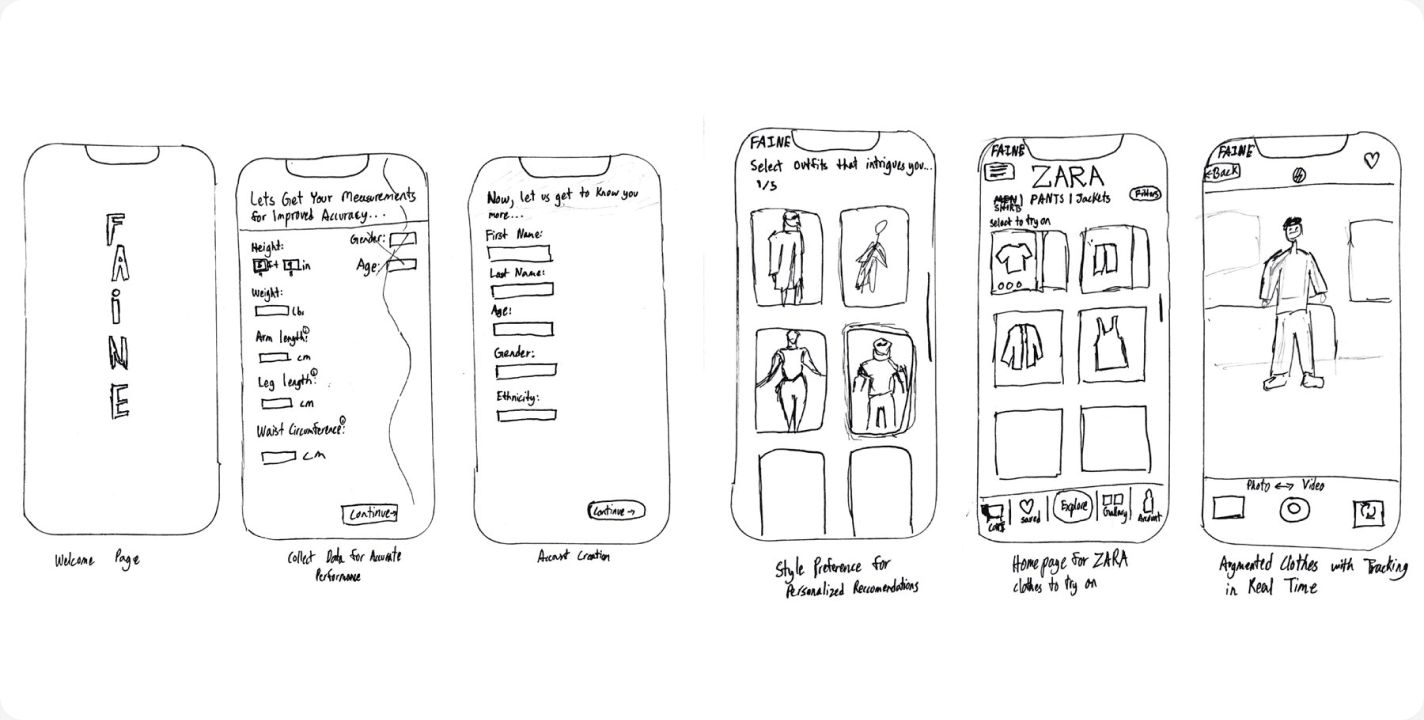
01 · Low fidelity
Mapped the core flow on paper
Welcome, measurements, account, style picks, catalog, and AR try-on.

02 · High fidelity, too early
It looked great but wasn’t usable
I skipped wireframes and jumped to a polished red prototype. Critique showed the flow didn’t hold together.
03 · Mid-fidelity reset
Stripped it to grayscale to fix the flow
Grayscale wireframes: a clearer flow and layouts that were easy to change.

04 · High fidelity, final
Tested with 4 people, then finalized
Soft pastel styling and familiar retail-app patterns (I used Uniqlo and Zara as references), plus an AR camera modeled on the iPhone camera. I tested it with 4 people. What they said, and what I changed, comes next.
Testing
Three changes from testing with 4 people
I tested the prototype with 4 people, from classmates and roommates to my professor. Their main feedback: onboarding asked for too much, too early, so people could drop off before they saw why FAiNE was worth it.
A more engaging app introduction
Testers wanted to see the value before any setup, so an animated intro now comes first.
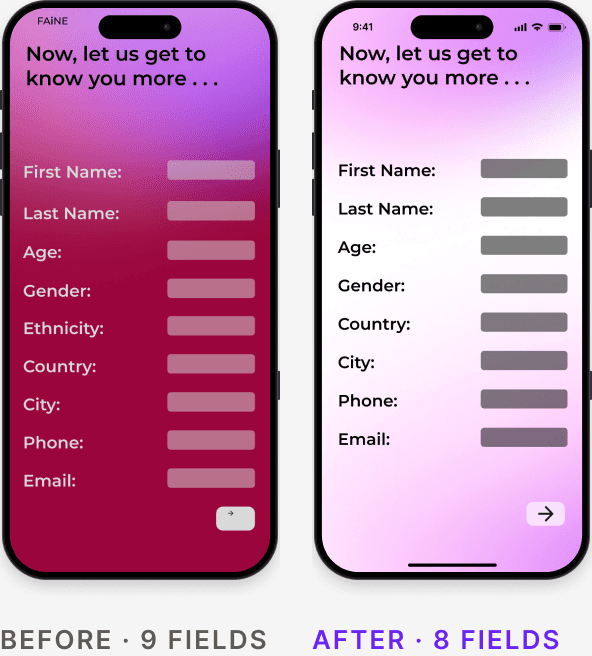
Less personal information at sign-up
Sign-up felt like a lot of questions before any payoff. I cut the ethnicity question as a first step.
A menu bar
A persistent way to reach brands and your wardrobe from anywhere.
Intro

Sign-up fields
Menu
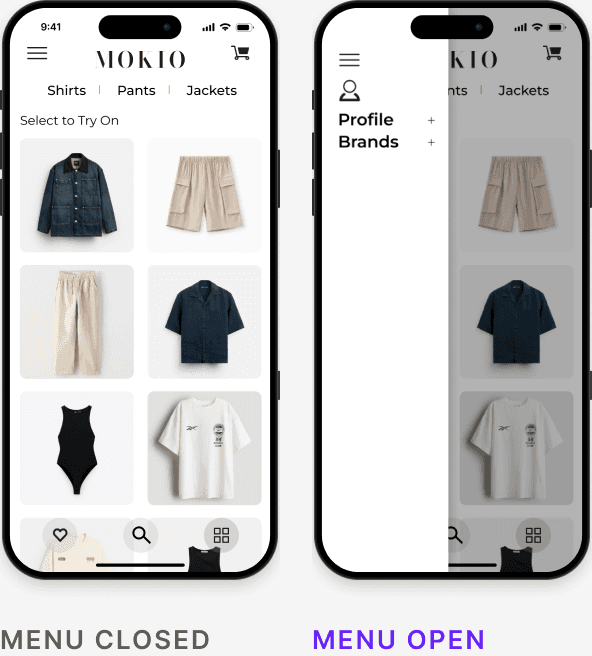
Before screens come from my first high-fidelity file. After screens are from the final prototype.

What testers loved
My Wardrobe
The feature testers liked most: scan the clothes you already own, then see them in the app and try them on next to anything new.
Expert review · September 2026
Show the try-on sooner
Two years later, a product manager who worked on an AI try-on product reviewed the prototype. They found the catalog busy and couldn’t tell which item led to the try-on, so they suggested a default. The catalog screens now open with one item already picked and a “Try it on” button, so the AR demo is one tap away.
The final flow
Six screens, after testing
The prototype as it stands now. Each screen notes the decision behind it.
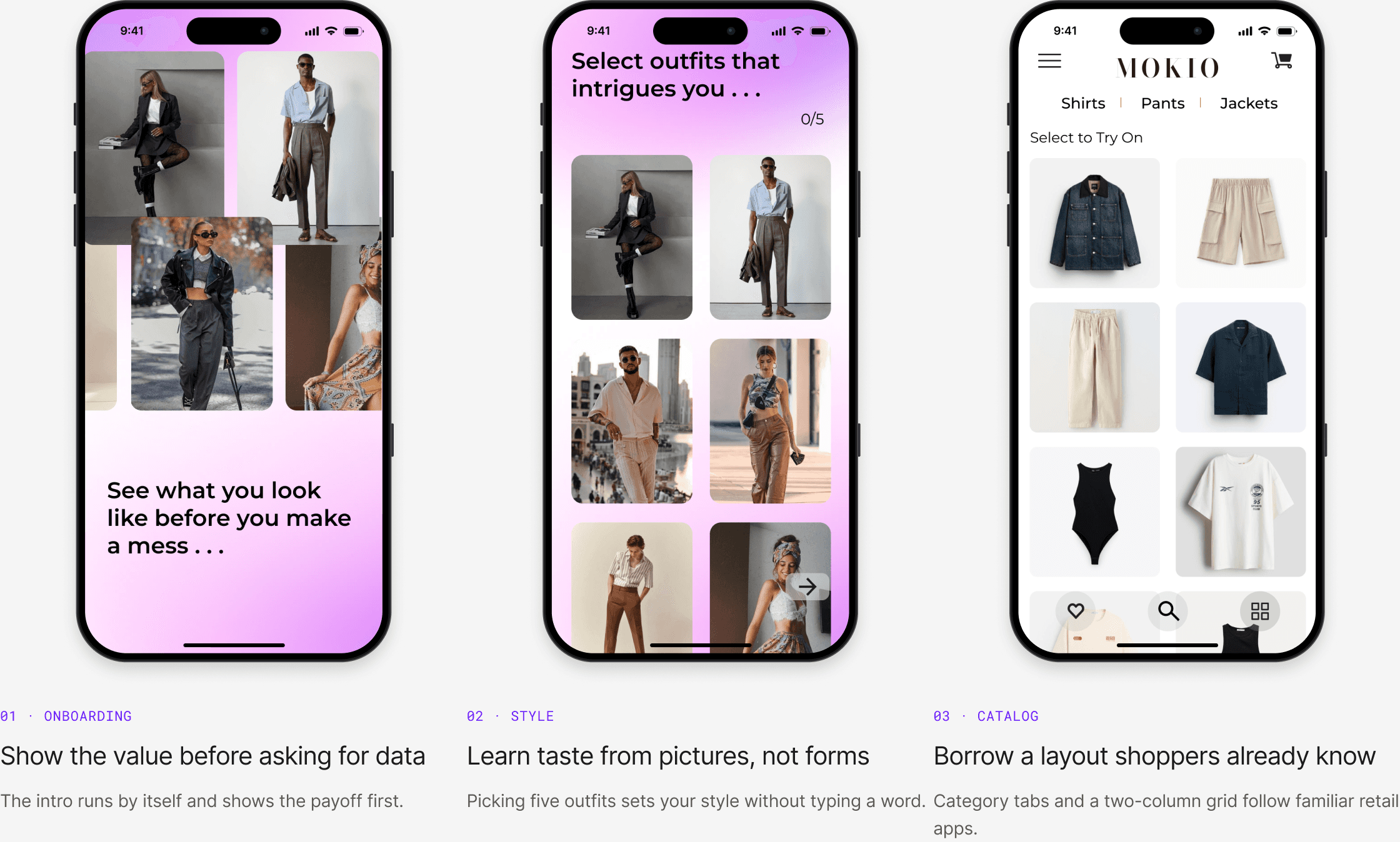

Concept for a class project. The store is my own brand, MOKIO, standing in for a real retailer, and the product photos are placeholders. FAiNE is not affiliated with any brand.
Prototype
Try the final flow yourself
Watch the intro, answer four quick-fit questions, pick a few styles, then browse the catalog and try the AR camera. It opens in a phone-sized frame.
How to use it
Click inside the phone and press R first, so the prototype starts from the beginning. Watch the intro: the photos keep moving while the message changes, and the arrow appears on the last line. Fill in the quick fit (or tap “Add your exact measurements” to see the full form), pick styles, then tap “Try it on” in the catalog to see the AR try-on.
Open full screen ↗
Class concept. Retailer names and product photos are placeholders.
Reflection
What this project taught me
Fidelity is a tool, not a milestone
Going high-fidelity first hid flow problems that an hour of wireframing would have exposed. I now sketch and wireframe before any color.
What I’d add today
Test whether people will actually enter a dozen body measurements. It’s the riskiest assumption in the concept, so I designed a lighter option below: four quick questions first, exact measurements later.

A lighter option I’d test next
Ask four quick questions first, and exact measurements later
Twelve measurements is a lot to ask before someone has seen a single outfit. The quick-fit screen asks for height, weight, usual size, and fit preference, which most shoppers know without a tape measure. Exact measurements become an optional upgrade for a closer fit.
Designed after the class ended, based on what testers told me, and now part of the prototype above. Not tested yet. The test: do more people finish onboarding, and how often do they come back to add exact measurements?
What’s next
From a phone app to a mirror
The prototype is the phone half. The bigger idea is a mirror-sized screen that shows you in real time and stays in sync with the app and your wardrobe.
At home or in store
A mirror that knows your closet
A large, mirror-like screen that shows AR outfits live, synced with your phone and the clothes you own. Save photos of any look, new or from your own wardrobe.
For shoppers
Try it, then buy it
Buy straight from the mirror or the app, with member deals and early try-ons of new pieces.
For schools and designers
Fit it before you cut it
Fashion schools and designers could fit and review garments virtually, saving fabric, labor, samples, shipping and returns.
A vision, not a build: none of this is designed or tested yet. The first test would be whether people keep their wardrobe up to date in the app.
© 2026 Moe Htet
·
Updated September 2026
·
Los Angeles, 8:29 PM